Claude Pro Weekly Limit Too Low : How to Stop Hitting the 95% Cap by Thursday

If you use Claude Pro or Claude Code for software engineering, you have almost certainly encountered that sinking feeling on a Thursday afternoon: your weekly account limit is 95% consumed, a bright red warning banner flashes across your terminal, and you still have two full workdays before the Sunday reset.
The instinctive reaction is frustration: is the Claude Pro weekly limit simply too low for professional developers?
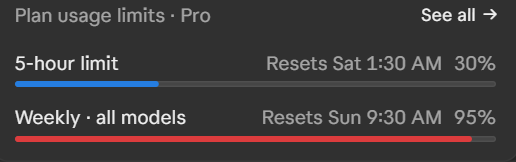
The short answer is no—the quota is actually generous, but Anthropic's default configuration silently encourages catastrophic token waste. Earlier this week, my own account hit 95% weekly capacity while my 5-hour rolling session was sitting comfortably at just 30%.
Here is why that happens, how the dual-limit math works against you, and four verified steps to keep your weekly limit lasting comfortably all seven days.
The Dual-Limit Trap: 5-Hour Session vs. Weekly Cap
Anthropic operates two entirely separate rate-limiting mechanisms on paid Claude Pro ($20/month) and Claude Max accounts:
- The 5-Hour Rolling Session: A short-term throttle designed to balance compute clusters during peak hours. If you send a burst of messages, you may hit a temporary cool-down that clears in 5 hours.
- The Weekly Quota (All Models): A hard weekly bucket shared across Claude Sonnet, Opus, and Haiku. This ceiling resets exactly once every seven days.
The trap catches developers because the desktop app and CLI often show your 5-hour bar in calm blue (e.g., 30% used), giving you a false sense of security. Meanwhile, behind the scenes, your weekly limit bar is creeping into the deep red zone at 85% to 95%.
Once your weekly cap hits 100%, your entire account locks down across both browser chat and terminal CLI until your weekly reset timestamp arrives.
Why Your Weekly Limit Drains Behind Your Back
Claude does not bill you simply for the words you type or the new functions Claude generates. Claude bills you for re-reading your entire conversation history, every loaded project file, and all MCP tool schemas on every single message.
Consider how a standard coding session unfolds: - Message 1: Claude reads 2,000 tokens (system prompt + user message). - Message 15: The chat includes test logs and 4 edited files (~45,000 tokens). - Message 35: The thread has accumulated historical diffs, error stack traces, and tool schemas (~180,000 tokens). - Message 50: Context exceeds 240,000 tokens.
At message 50, if you type a short one-line prompt like "can you center the button in the modal?", Claude must ingest all 240,000 tokens of prior conversation history to answer. Doing that five times in a row burns 1.2 million tokens within twenty minutes.
Step 1: Turn Off the 2 Token-Draining Capabilities
Inside the Claude web interface and desktop app settings, two default toggles quietly consume tokens on every prompt:
| Setting Name | Default | The Hidden Cost | Action |
|---|---|---|---|
| Artifacts that use Claude | ON | Builds interactive micro-apps that trigger background API inference cycles on user interactions. | Toggle OFF |
| Charts and diagrams in chat | ON | Mandates heavy visual rendering syntax and chart definitions inside model responses. | Toggle OFF |
How to fix: Navigate to Settings → Capabilities in your Claude interface and toggle both options to OFF. Only re-enable charts when you specifically need to visualize complex numerical tables.
Step 2: Enforce the 300k Compaction Window (/autocompact 300)
In Claude Code, conversations tend to grow indefinitely until memory exhaustion occurs. You can prevent this with Claude Code's built-in compaction utility:
/autocompact 300
Shorthand Rule: Entering
300automatically instructs Claude Code to set a 300,000-token threshold. You do not need to type five zeros.
When your active thread crosses 300k tokens, Claude summarizes prior conversational history into a structured technical summary. You retain project architecture, variable naming conventions, and progress notes without paying to re-read thousands of lines of obsolete debugging traces.
To make this permanent across all terminal sessions, define it in your ~/.claude/settings.json:
{
  "autoCompactWindow": 300000,
  "outputStyle": "Concise"
}
Step 3: Never Switch Models Mid-Conversation
Anthropic provides up to a 90% discount on cached prompt input tokens. When Claude reads the same project context, repository files, and system prompt repeatedly, prompt caching dramatically lowers the weekly quota drain.
However, each model family (Sonnet 5.5, Opus 5.5, Haiku 5.5) maintains an entirely distinct cache partition.
If you start a session with Claude Sonnet 5.5, switch to Opus 5.5 for a difficult refactor, and switch back to Sonnet, the prompt cache is completely wiped. Claude is forced to re-read every token from scratch at full uncached input pricing, doubling your weekly consumption rate in seconds.
The Golden Rule: Lock Claude Sonnet 5.5 as your primary coding engine in settings.json, and keep it locked from prompt one until the task is closed.
Step 4: Block Bulky Directories via permissions.deny
A widespread developer rumor claims you can create a .claudeignore file to prevent Claude from indexing large folders.
Official documentation confirms that Claude Code has no native .claudeignore support. While Claude honors .gitignore for autocomplete suggestions, it will happily read ignored files if referenced in a prompt or bash subshell.
The only reliable way to block massive directories like node_modules/, dist/, or .venv/ is adding explicit permissions.deny rules in ~/.claude/settings.json:
{
  "permissions": {
    "deny": [
      "Read(node_modules/**)",
      "Read(dist/**)",
      "Read(build/**)",
      "Read(.venv/**)",
      "Read(.env*)"
    ]
  }
}
This simple block prevents accidental directory dumps that can incinerate 80,000 tokens in a single careless command.
Verified Takeaway
Hitting your 95% Claude Pro weekly limit by Thursday is not an inevitable consequence of heavy coding—it is a symptom of compounding conversation history, mid-thread model switching, and unfiltered terminal logging.
Implement /autocompact 300, lock your primary model to Sonnet 5.5, disable background capabilities, and use permissions.deny to firewall your dependencies.
For the complete architectural breakdown, radar benchmarks, and ready-to-run terminal prompts, read our comprehensive guide on how to save Claude Pro tokens and optimize Claude Code limits on SoftReviewed.


Comments
Post a Comment