Pictory MCP Server: Turn AI Coding Agents Into Autonomous Video Producers
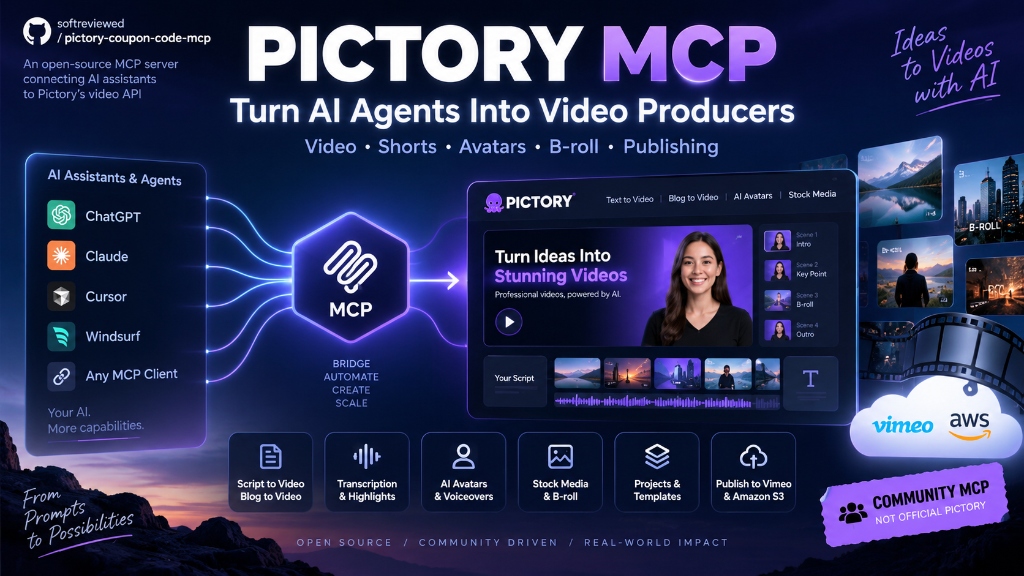
Figure 1: Hands-on video walkthrough of the open-source Pictory MCP automation engine.
Until recently, video production has remained an isolated island in the artificial intelligence revolution. While modern developers deploy autonomous AI coding agents inside Cursor, Claude Desktop, and Windsurf to write software, manage databases, and orchestrate cloud infrastructure, creating marketing videos, product demos, and social clips still demanded manual clicking through web interfaces.
The open-source Pictory MCP Server on GitHub fundamentally rewrites this operational dynamic. By exposing Pictory's complete enterprise video generation engine through Anthropic's open Model Context Protocol (MCP) standard, any modern AI assistant can now script, storyboard, voiceover, render, and publish professional video assets directly from an IDE terminal or conversational interface.
⚡ The Architecture: How MCP Bridges Coding Agents to Video Studios
To understand why this development matters, consider how video production typically operates. A creator writes a script, manually logs into a cloud video editor, searches for relevant B-roll footage, adjusts audio timing, adds background music, renders the final MP4, and downloads the file. Each step requires human intervention.
The Model Context Protocol establishes a standard JSON-RPC communication bridge over standard input/output (stdio) between an AI agent and external tool APIs. When you connect the Pictory MCP server, your AI assistant receives a curated tool catalog that turns conversational instructions into precise cloud API calls:
"Take our newly merged pull request notes, extract 3 core features, and render a 60-second vertical TikTok short with AI voiceover and B-roll."
Execution Flow:
Claude / Cursor ➔
pictory_video.create_storyboard() ➔ Cloud AI Generation ➔ pictory_integrations.render_job() ➔ Production MP4 Video File
🛠️ The Five Core Tool Suites in Pictory MCP
The server is organized into five modular tool suites designed for granular programmatic control over the video production lifecycle:
| Tool Suite | Primary Methods | Core Capability |
|---|---|---|
| 1. Video Creation | create_storyboard, render_video |
Converts raw scripts or blog URLs into timed video scenes with automated visual matching. |
| 2. Transcription & Highlights | transcribe_video, extract_highlights |
Ingests long-form recordings (podcasts, webinars), removes filler words, and clips viral moments. |
| 3. Asset Library | search_broll, list_voices |
Searches 10M+ licensed Getty Images/Storyblocks clips and 300+ ElevenLabs neural voices. |
| 4. Project Management | sync_templates, patch_scene |
Synchronizes master brand palettes, intros, outros, and custom fonts across all workspace projects. |
| 5. Cloud Integrations | publish_vimeo, export_s3 |
Dispatches finished high-res MP4 renders directly into your private AWS S3 bucket or Vimeo channel. |
🚀 Step-by-Step Setup: Connecting to Claude Desktop & Cursor
The server is fully containerized with Docker and requires zero complex dependencies. Here is how to configure it inside your local development environment:
1. Pull and Run via Docker
-e PICTORY_CLIENT_ID="your_client_id" \
-e PICTORY_CLIENT_SECRET="your_client_secret" \
softreviewed/pictory-coupon-code-mcp:latest
2. Add to Claude Desktop Configuration (claude_desktop_config.json)
"mcpServers": {
"pictory": {
"command": "python",
"args": ["-u", "C:/Users/yourname/MCP/pictory-mcp/server.py"],
"env": {
"PICTORY_CLIENT_ID": "your_client_id",
"PICTORY_CLIENT_SECRET": "your_client_secret"
}
}
}
}
💡 Three Real-World Automation Workflows
Workflow 1: Automated Blog Article to Video Pipeline
By pairing the MCP server with a static site generator or headless CMS, you can configure a GitHub Action that fires whenever a new markdown post is committed. The agent parses the article text, selects the five most impactful takeaways, queries Pictory to assemble relevant stock footage, and renders a companion video short ready for embedding.
Workflow 2: Podcast Repurposing & Viral Highlight Extraction
Rather than hiring an editor to manually scrub through 60-minute podcast recordings, developers can supply the raw audio file to pictory_transcribe. The server automatically timestamps the conversation, identifies high-velocity dialogue bursts, generates accurate animated subtitles, and slices out 3-5 vertical clips for TikTok, Shorts, and Instagram Reels.
Workflow 3: Text-Based Video Patching via IDE
Need to swap an outdated statistic or fix a mispronounced brand name? Instead of re-rendering an entire video project, you can instruct your coding assistant to target a specific scene ID using patch_scene. The agent replaces the sentence text, recalculates duration, updates the synthetic voiceover track, and leaves surrounding scenes untouched.
⚠️ Operational Constraints & Best Practices
While programmatic video generation unlocks massive productivity gains, developers should keep several architectural constraints in mind:
- Cloud Render Latency: Full 1080p video rendering is compute-intensive and occurs asynchronously in Pictory's cloud. Scripts should always implement polling loops that check render job status rather than expecting immediate synchronous output.
- API Quota Management: Enterprise video accounts carry monthly rendering minute caps. Always inspect job parameters before triggering batch renders.
- Aspect Ratio Alignment: Ensure storyboard parameters explicitly specify
16:9for desktop/YouTube long-form or9:16for vertical Reels and Shorts.
🔗 Resources & Strategic Next Steps
Ready to deploy autonomous video creation inside your development stack?
- Download the Server: Clone the official open-source Pictory MCP Server on GitHub to inspect tool implementations and launch your local Docker container.
- In-Depth Review & Pricing Breakdown: Read our comprehensive SoftReviewed Pictory review & discount guide for complete pricing comparisons, feature evaluations, and discount stacking instructions.


Comments
Post a Comment